GTA 6 Xbox 60FPS Glitch: How to Unlock FPS, Performance Results and Risks

Contents
The GTA 6 Xbox 60FPS glitch is a recently discovered Quick Resume bug that allows Grand Theft Auto VI to run above its normal 30 frames per second (FPS) limit on Xbox Series X and Xbox Series S.
However, it does not provide a stable 60fps experience. Players have reported fluctuating frame rates, unusually fast character animations and gameplay running faster than intended.
The workaround emerged shortly after GTA 6 launched on 19 November 2026, with Reddit user Meowwie64 demonstrating how changing Xbox refresh-rate settings and using Quick Resume could remove the frame-rate cap.
While some lightweight scenes reportedly exceed 60fps, demanding activities such as driving through Vice City generally produce much smaller improvements.
For players hoping to experience Rockstar’s open-world game at higher frame rates, the discovery is technically interesting. However, the difference between unlocking FPS and achieving smooth gameplay is important.
What Is the GTA 6 Xbox 60FPS Glitch?
The GTA 6 Xbox 60FPS glitch is an unofficial workaround that removes the game’s normal 30fps restriction through a combination of Xbox display settings and Quick Resume.
The discovery was shared publicly in November 2026 and subsequently reported by gaming publications including Pure Xbox, RockstarINTEL and GamesRadar+.
Ordinarily, GTA 6 targets 30fps across its supported console platforms, including Xbox Series X, Xbox Series S, PlayStation 5 and PlayStation 5 Pro.
The glitch allows the Xbox hardware to attempt to render additional frames rather than remaining restricted to that target.
However, three important limitations distinguish it from an official performance mode:
- The frame rate fluctuates depending on the location and graphical workload.
- Gameplay speed and certain character animations increase unexpectedly.
- The workaround is unsupported and may stop working after a game or console update.
In other words, it is an experimental bug rather than a properly optimised graphics setting.
| Feature | Normal GTA 6 gameplay | Xbox 60FPS glitch |
| Frame-rate target | 30fps | Unlocked |
| Typical performance | Approximately 30fps | Often around 35–40fps in demanding gameplay |
| Maximum reported FPS | Restricted to the normal target | 60fps or higher in lightweight scenes |
| Character animation speed | Normal | Sometimes accelerated |
| Frame pacing | Designed around 30fps | Variable |
| Console support | PS5 and Xbox Series X/S | Reported on Xbox Series X/S |
| Official Rockstar feature | Yes | No |
The reported performance figures come from publicly shared player observations and video testing, not standardised independent benchmarks.
How Can You Activate the GTA 6 60FPS Glitch on Xbox?
Players have reported that the glitch can be reproduced by changing the Xbox display refresh rate while GTA 6 is launching and then returning to the game through Quick Resume.
The original demonstration used GTA 6 version 01.002.001 and an Xbox Series X connected to a 120Hz display.
Requirements Before Trying the Glitch
You will need:
- An Xbox Series X or Xbox Series S.
- A television or monitor that supports 120Hz.
- Grand Theft Auto VI installed on the console.
- Access to Xbox Quick Resume.
- Another installed game that can be launched normally.
The workaround is not guaranteed to work on subsequent software versions.
Step-by-Step Xbox 60FPS Glitch Method
Step 1: Change the Xbox refresh rate to 60Hz
Open Xbox Settings and navigate to General, followed by TV & display options.
Change the refresh rate from 120Hz to 60Hz.
Step 2: Launch GTA 6
Start Grand Theft Auto VI normally from your Xbox library or home screen.
Step 3: Wait for the six-star loading sequence
During the game’s introductory loading animation, wait until the six stars appear.
This timing is part of the original reported method.
Step 4: Switch the Xbox back to 120Hz
Return to the Xbox display settings and change the refresh rate from 60Hz back to 120Hz.
Step 5: Launch another game without closing GTA 6
Open the Xbox Guide and start another installed game.
The original instructions specify launching a game afresh rather than resuming a different game that is already suspended.
Do not manually quit GTA 6.
Step 6: Return to GTA 6 through Quick Resume
After the second game has started, switch back to GTA 6 using Xbox Quick Resume.
If the workaround succeeds, GTA 6 may resume without its normal 30fps frame-rate restriction.
Step 7: Check the performance
Move between indoor environments and more demanding open-world locations to observe whether frame rates and gameplay speed have changed.
The player who discovered the glitch reported that the effect can vary considerably depending on what the game is rendering.
This method is experimental. It is not a Rockstar-approved performance option, and users should save their progress normally before experimenting.
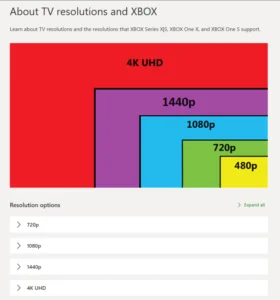
Xbox TV & display options showing the 60Hz and 120Hz refresh-rate settings used in the GTA 6 workaround.
Does the GTA 6 Glitch Actually Deliver 60FPS?
The GTA 6 glitch can reportedly produce frame rates of 60fps or higher, but that does not mean the game maintains 60fps during ordinary gameplay.
Testing discussed by Pure Xbox indicates that demanding open-world scenes generally run considerably below that figure.
Driving through busy locations can bring performance closer to 35–40fps, while less demanding environments may allow the hardware to produce more frames.
GTA 6 Reported FPS Results
| Gameplay situation | Reported unlocked performance | Main limitation |
| Normal gameplay | Variable, often above 30fps | Inconsistent frame pacing |
| Busy roads and highway driving | Around 35–40fps | Heavy world-rendering demands |
| Less demanding indoor scenes | Can exceed 60fps | Accelerated animations |
| Selected lightweight scenes | Higher peaks, sometimes around 90–100fps | Not representative of normal gameplay |
| Standard mode without glitch | 30fps target | Consistent design target |
These figures are approximate observations from demonstrations and player reports. They should not be interpreted as guaranteed performance on every Xbox.
The results also highlight a common misunderstanding about gaming performance.
A higher FPS counter does not automatically mean that the game feels better.
Consistent frame delivery, normal animation timing and predictable control responsiveness are essential components of a smooth gameplay experience.
Our assessment of the available evidence is that the glitch improves the numerical frame rate in certain situations but introduces compromises that can make the overall experience worse.
Why Does the GTA 6 Xbox Glitch Make Gameplay Run Faster?
One of the most unusual aspects of the GTA 6 FPS glitch is that gameplay appears to accelerate when the frame rate increases.
The original Reddit user, Meowwie64, reported that character animations could run at twice their intended speed or faster in certain locations.
Other demonstrations suggest that movement and general gameplay timing can also become noticeably faster.
This indicates that at least some gameplay systems may not behave independently of the frame rate when the game is forced outside its intended operating conditions.
Frame Rate and Gameplay Timing
A game must coordinate several different processes, including:
- Rendering images on screen.
- Character animations and movement.
- Physics calculations and interactions.
- Vehicle behaviour.
- Environmental systems and simulation timing.
When those processes are properly separated, increasing the rendering frame rate should not change how quickly the game world progresses.
However, the Xbox glitch appears to interfere with that relationship.
The precise underlying cause has not been publicly established by Rockstar, so it would be premature to describe the issue as a confirmed flaw in the entire game engine.
Interestingly, the original player report suggests that cinematic cutscenes can continue at their intended speed while interactive gameplay becomes accelerated.
That distinction supports the possibility that different parts of GTA 6 use different timing arrangements.
For players, though, the practical consequence is straightforward: faster rendering does not necessarily produce a better experience if movement, animations and other mechanics become unnatural.
Does the GTA 6 60FPS Glitch Work on Xbox Series S?
Yes. Although the original demonstration focused on Xbox Series X, subsequent reports and footage indicate that the workaround can also be triggered on Xbox Series S.
Pure Xbox highlighted testing by Fuzion Xbox Testing covering both consoles.
However, compatibility does not mean equivalent performance.
The Xbox Series X has more powerful graphics hardware, giving it greater rendering capacity than Series S.
Both consoles also run GTA 6 with a 30fps target under normal conditions.
| Performance factor | Xbox Series X | Xbox Series S |
| GTA 6 normal FPS target | 30fps | 30fps |
| Quick Resume workaround reported | Yes | Yes |
| Compatible 120Hz display needed | Yes | Yes |
| Stable unlocked 60fps confirmed | No | No |
| Accelerated gameplay possible | Yes | Yes |
| Official 60fps mode available | No | No |
Players should not assume that installing the game on Series X automatically enables 60fps or that Series S can reproduce the same frame-rate peaks.
The performance difference depends on graphics workload, software version and other testing conditions.
For a broader assessment of GTA 6’s visuals, gameplay and platform limitations, read our GTA 6 spoiler-free review.
Why Did Rockstar Limit GTA 6 to 30FPS on Consoles?
Rockstar’s decision to target 30fps is closely connected to the computational demands of GTA 6’s open world.
Unlike games with relatively small environments, GTA 6 must coordinate dense urban locations, vehicles, artificial intelligence, lighting, character behaviour and numerous environmental systems.
Rendering all those elements at a higher frame rate requires substantially more processing capacity.
Rockstar Games senior vice president of technology Jonathon Ashcroft addressed the issue in an interview reported by TechRadar Gaming ahead of launch.
Ashcroft explained that the development team had to balance the demands of world simulation and graphics processing within an extremely limited time budget.
He stated:
“The frame rate we’ve chosen gives us the right balance of presentation, simulation, and gameplay.”
His explanation is particularly relevant to the newly discovered glitch.
Even if the Xbox hardware can occasionally produce more than 60 frames per second in a simple scene, that does not demonstrate that it can maintain the same performance across the game’s most demanding environments.
Rockstar technology production director Marc Chambers also explained that GTA 6 uses custom-built technology designed to achieve the studio’s intended experience.
This indicates that the 30fps decision is part of a broader technical and creative balance rather than simply a missing menu option.
Players can explore official game information, media and updates through the Rockstar Games GTA VI website.
What Are the Risks of Using the GTA 6 Xbox 60FPS Glitch?
The most significant drawback is not the possibility of a higher FPS counter. It is the effect that an unsupported performance state can have on ordinary gameplay.
Pure Xbox news editor Fraser Gilbert, reporting on the discovery on 22 November 2026, argued that the accelerated gameplay made the workaround undesirable even before considering its inconsistent performance.
His assessment reflects a practical problem: GTA 6’s animations, movement and presentation are designed to work together, and the glitch can disrupt that balance.
| Potential issue | What players should know |
| Double-speed animations | Demonstrated in player reports |
| Unstable FPS | Reported in testing footage |
| Unnatural movement | Can occur while the glitch is active |
| Crashes or other bugs | Possible in an unsupported state, but not established as universal |
| Save-game problems | No confirmed widespread save corruption attributable to this glitch |
| Console overheating | No verified evidence that this workaround itself causes hardware damage |
| Future compatibility | A later update may change or remove the behaviour |
It is important not to exaggerate the risks.
There is no verified evidence that simply reproducing this glitch automatically causes an Xbox account ban, permanently damages the console or corrupts every save file.
Nevertheless, deliberately running a game outside its intended performance configuration can create unpredictable behaviour.
Players primarily interested in completing the story or preserving a stable experience should use the normal 30fps mode.
How Can You Reverse the GTA 6 Xbox 60FPS Glitch?
Fortunately, reports indicate that the frame-rate workaround can be reversed without reinstalling GTA 6.
The most straightforward method is to close the game completely and launch it again.
- Press the Xbox button to open the Guide.
- Highlight GTA 6.
- Press the Menu button and select Quit.
- Launch GTA 6 again from the Xbox home screen or library.
- Confirm that gameplay has returned to its normal timing.
Players can also manage Quick Resume settings on supported Xbox consoles.
In an April 2026 Xbox platform update, Microsoft introduced the ability to disable Quick Resume individually for supported games.
The company explained that the option helps titles launch fresh rather than restoring a previous suspended session.
To find the feature, open the game tile’s management options and look for Quick Resume settings, where available.
Microsoft explains the feature in its official Xbox Quick Resume update.
Disabling Quick Resume may prevent this particular workaround from being triggered while the setting remains disabled. Simply closing and restarting GTA 6 is the more direct way to return to normal gameplay.
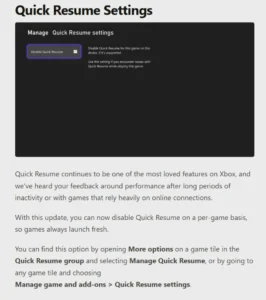
Xbox Quick Resume management settings showing how players can disable Quick Resume for an individual game.
Can 120Hz and VRR Improve GTA 6 Without the Glitch?
A 120Hz display and Variable Refresh Rate (VRR) can influence how gameplay is presented, but they do not automatically increase GTA 6’s rendering performance.
The distinction matters because some users may see a refresh-rate figure on their television and mistakenly interpret it as the game’s actual FPS.
120Hz Display Output
A 120Hz screen can refresh its image 120 times per second. However, a game targeting 30fps does not suddenly render 120 unique frames simply because that display mode is enabled.
Variable Refresh Rate
VRR allows a compatible display to coordinate its refresh timing with changing frame delivery, helping reduce certain forms of tearing or uneven presentation.
It does not create additional rendered game frames.
Unlocked Frame Rate
The Quick Resume bug changes the game’s normal frame-rate restriction, allowing higher rendering rates in some situations.
However, this is separate from the display’s refresh rate and can introduce abnormal gameplay timing.
The original glitch report mentioned using VRR, but did not establish that VRR was mandatory.
For anyone considering a new television or monitor specifically for GTA 6, a 120Hz screen should not be purchased on the assumption that this glitch provides a reliable 60fps mode.
Has Rockstar Fixed the GTA 6 Xbox 60FPS Glitch?
As of 23 November 2026, reports indicate that the Quick Resume frame-rate glitch remains reproducible on GTA 6 version 01.002.001.
There has been no verified official announcement specifically confirming a patch for this issue or explaining the underlying cause.
However, that situation could change with future title updates or Xbox system changes.
Rockstar may choose to correct the interaction that allows the game to resume with an unlocked frame rate.
Alternatively, the studio could investigate the behaviour as part of wider performance optimisation.
Neither outcome should be presented as confirmed until Rockstar makes an announcement or a new version is independently tested.
Players should therefore distinguish three separate developments:
- A patch that removes the Quick Resume glitch.
- An update that improves normal 30fps stability.
- An official graphics mode that supports a higher frame rate.
These changes are not interchangeable. Removing the bug would not automatically mean that Rockstar has abandoned plans for performance improvements.
Readers following the game’s launch history can also revisit our GTA 6 release date guide for the background to its November 2026 arrival.
Will GTA 6 Get an Official 60FPS Mode on Xbox?
Rockstar has not announced an official 60fps performance mode for GTA 6 on Xbox Series X or Series S as of 23 November 2026.
The Quick Resume glitch demonstrates that the game’s normal frame-rate restriction can be bypassed in certain conditions, but it does not prove that a fully optimised 60fps mode is achievable on existing console hardware.
A genuine performance mode would need to maintain acceptable rendering performance while preserving correct gameplay speed, animation timing and overall stability.
It might also require changes to visual settings, rendering techniques or world-simulation systems.
The technical comments made by Rockstar’s Jonathon Ashcroft suggest that balancing these demands is a substantial challenge.
For now, players should treat a future 60fps mode as a possibility rather than a confirmed feature.
Is the GTA 6 Xbox 60FPS Glitch Worth Trying?
The glitch is an interesting technical discovery, particularly for players who enjoy testing console performance and understanding how games behave beyond their intended limits.
It also provides an unusual glimpse into how GTA 6 responds when the frame-rate cap is removed.
However, it is difficult to recommend the workaround for regular gameplay.
The biggest limitation is not simply that 60fps cannot be sustained consistently. It is that higher frame rates can interfere with the speed and timing of the game itself.
In a title where driving, combat, exploration and cinematic presentation are closely connected, maintaining the correct gameplay speed is more valuable than producing a higher FPS reading in isolated scenes.
Our editorial verdict: The GTA 6 Xbox 60FPS glitch is worth understanding as a performance experiment, but the standard 30fps mode remains the more dependable choice for playing the game as intended.
Frequently Asked Questions
Does the GTA 6 60FPS glitch work on Xbox Series X?
Yes. The original demonstration used Xbox Series X and a 120Hz display. The workaround involves changing display refresh-rate settings and resuming GTA 6 through Quick Resume. Performance remains inconsistent.
Can you get 60FPS in GTA 6 on Xbox Series S?
The glitch has also been demonstrated on Xbox Series S. However, there is no confirmed stable 60fps mode, and the console may struggle to maintain higher frame rates during demanding gameplay.
Do you need a 120Hz TV for the GTA 6 FPS glitch?
The published method requires a 120Hz-capable display because it relies on changing Xbox output between 60Hz and 120Hz. A television restricted to 60Hz cannot reproduce the method as described.
Can the GTA 6 60FPS glitch damage your Xbox?
There is no verified evidence that this particular glitch permanently damages Xbox hardware. However, the workaround is unsupported and may result in unstable gameplay or other software problems.
Can you get banned for using the GTA 6 FPS glitch?
No automatic ban has been established for this Quick Resume workaround. It is a performance-related bug rather than a confirmed account-enforcement issue. Players should still follow Rockstar’s and Xbox’s applicable rules.
How do you fix the GTA 6 double-speed animation glitch?
Completely quit GTA 6 from the Xbox Guide and restart the game. Reports indicate this restores the standard 30fps behaviour and normal gameplay timing.